GitHub Actions OIDC AWS: Deploy Without Permanent AWS Access Keys
Originally published on Naveed Ahmed's Engineering Blog.
For years, a common way to deploy from GitHub Actions to AWS was to create an IAM user, generate access keys, and store them as GitHub secrets.
It's simple, but it creates a long-lived credential that needs ongoing security management.
GitHub Actions OIDC provides a cleaner authentication model.
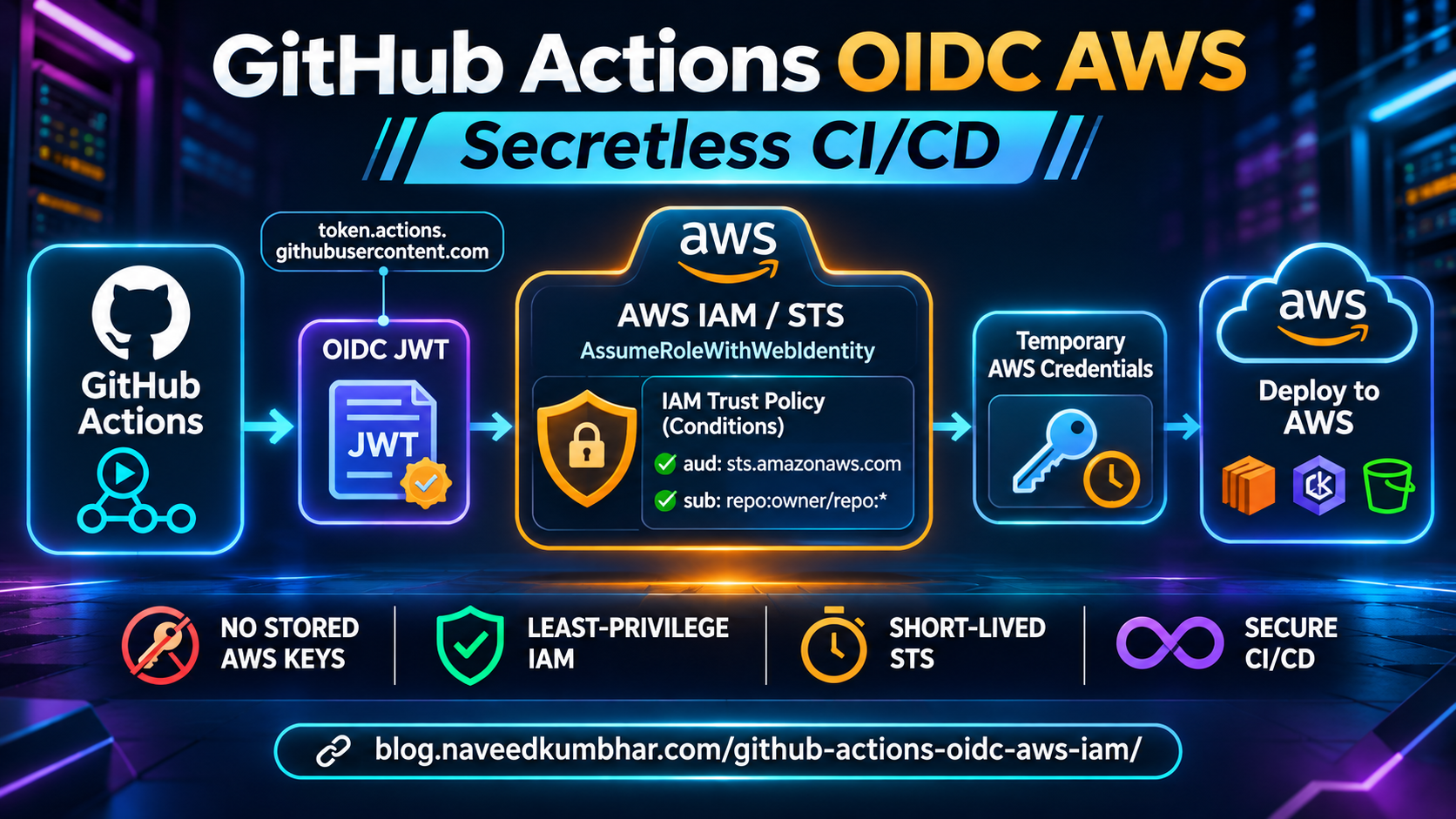
Instead of storing AWS access keys, the workflow exchanges a signed GitHub identity token for temporary AWS credentials.
1. How OIDC Authentication Works
The workflow requests an OIDC token from GitHub.
AWS validates that token against the IAM role's configured trust policy.
If the token is valid and the requested role assumption is allowed, AWS STS issues temporary credentials.
This separates GitHub's identity assertion from AWS's authorization decision.
2. Configure the IAM Identity Provider
Register GitHub as an OIDC identity provider in AWS.
Issuer:
https://token.actions.githubusercontent.com

Audience:
sts.amazonaws.com
Only create the provider in the AWS account where you'll be using it.
A centrally managed Terraform configuration can help maintain this setup across accounts.
3. Restrict the IAM Trust Policy
A common mistake is allowing too many repositories to assume the same role.
Your trust policy should identify the approved repository and deployment context.
For a repository using the traditional branch subject format:
{
  "StringEquals": {
    "token.actions.githubusercontent.com:aud": "sts.amazonaws.com",
    "token.actions.githubusercontent.com:sub": "repo:YOUR_ORG/YOUR_REPO:ref:refs/heads/main"
  }
}
This is only the policy condition, not a complete trust policy.
Check the subject format used by your GitHub repository, particularly for newer immutable subject formats.
Avoid overly broad wildcard patterns and combine trust restrictions with least-privilege role permissions.
4. Update GitHub Actions
Grant the workflow permission to request an OIDC token:
permissions:
  id-token: write
  contents: read
Then use aws-actions/configure-aws-credentials to request temporary AWS credentials for an approved role.
For production, pin action dependencies to reviewed commit SHAs and protect the deployment workflow.
5. Use Protected Environments
For sensitive deployments, GitHub Environments can provide extra controls.
Require reviewers, restrict allowed deployment branches, and configure IAM trust to recognize the appropriate environment subject.
Remember that environment-based subjects are different from branch-based subjects.
6. Troubleshooting Role Assumption
When authentication fails, verify:
- Correct AWS account and IAM role ARN
- IAM OIDC provider configuration
- Matching audience and subject conditions
- Workflow
id-tokenpermission - Branch or environment restrictions
- CloudTrail events and job logs
An OIDC configuration is only as secure as its trust policy and workflow permissions.
Read the Full Tutorial
My complete guide covers Terraform, IAM role design, GitHub Actions workflow examples, security checks, and common authentication failures.
Read GitHub Actions OIDC AWS: Secretless CI/CD Guide
Final Thoughts
Moving away from permanent AWS access keys is a worthwhile CI/CD improvement.
Start with narrowly scoped roles, verify the exact identity claims, and use protected deployment workflows.
What is your preferred approach for authenticating GitHub Actions to AWS?
Written by Naveed Ahmed — DevOps & Platform Engineering
About the author
- Senior DevOps, Cloud & Site Reliability Engineer at DigitalOcean. I write about modern container orchestration, Linux systems, and cloud-native architecture. Explore my guides, architectures, and portfolio: • Website: https://naveedkumbhar.com • Resume: https://cv.naveedkumbhar.com • Blog: https://blog.naveedkumbhar.com • Newsletter: https://news.naveedkumbhar.com
Comments
Join the discussionNo comments yet. Be the first to comment.