How a Kubernetes Database Migration Caused a 502 Production Outage
Originally published on Naveed Ahmed's Engineering Blog.
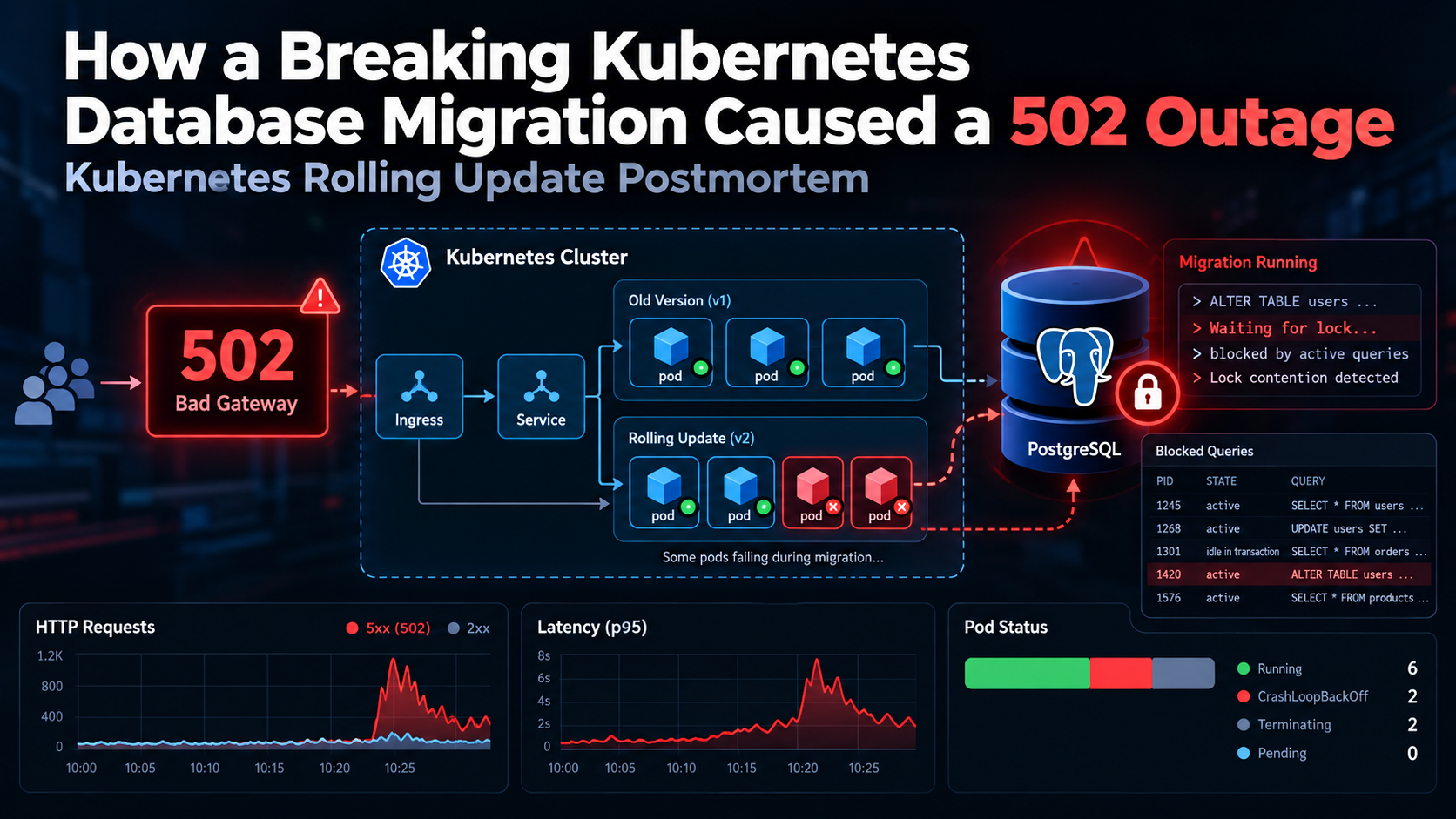
At 2:15 AM, a routine Kubernetes rolling update turned into a production outage.
Within minutes, API response times increased, PostgreSQL connections became exhausted, and users started seeing 502 Bad Gateway errors.
The deployment included a breaking database migration that removed a column while older application pods were still running.
PostgreSQL lock contention made the situation worse, and even rolling back the Kubernetes deployment didn't immediately fix the issue.
The incident lasted around 24 minutes.
Here's what went wrong and what we can learn from it.
1. Why the Kubernetes Rolling Update Failed
Kubernetes rolling updates replace application pods gradually to minimize downtime.
But there's an important detail: old and new application versions can run at the same time.
Kubernetes Rolling Update
         |
         v
  Application v1
     (Old Pods)
         +
  Application v2
     (New Pods)
         |
         v
  PostgreSQL Database
In this incident, the database migration removed a column still required by the older application version.
Those pods continued running queries against a schema that no longer supported them.
The result was application errors, even though Kubernetes was following its normal rolling update process.
The lesson: Rolling updates only work safely when application versions remain compatible with the shared database schema.
2. How PostgreSQL Locks Triggered a Cascade
The migration also encountered PostgreSQL lock contention.
Operations such as dropping a database column require an ACCESS EXCLUSIVE lock.
For example:
ALTER TABLE users DROP COLUMN full_name;
If other transactions hold conflicting locks, the migration must wait.
New queries can then queue behind the waiting migration, increasing database response times.
The failure chain looked like this:
Database Schema Migration
          |
          v
Exclusive Lock Wait
          |
          v
Blocked PostgreSQL Queries
          |
          v
Connection Pool Exhaustion
          |
          v
Application Timeouts
          |
          v
HTTP 502 / 5xx Errors
To investigate blocked PostgreSQL sessions, this query can help:
SELECT
    pid,
    query,
    wait_event_type,
    wait_event,
    pg_blocking_pids(pid) AS blocking_pids
FROM pg_stat_activity
WHERE cardinality(pg_blocking_pids(pid)) > 0;
It shows database sessions waiting on other sessions, which can help identify lock contention during an incident.
3. Why Rolling Back Didn't Fix the Problem
When a Kubernetes deployment fails, rolling back is often one of the first recovery options.
kubectl rollout undo deployment/api
But here's the catch.
This restores the previous application Deployment revision. It doesn't automatically restore the database schema.
If a migration has already deleted a column, older application versions may still fail after rollback.
Application rollback and database rollback are two separate operations.
This is why backward-compatible database migrations are so important.
4. The Safer Solution: Expand and Contract
The Expand and Contract pattern reduces the risk of breaking applications during database migrations.
Instead of changing everything in one deployment, divide the process into four phases.
Phase 1: Expand
Add the new database structure while keeping the existing schema intact.
ALTER TABLE users ADD COLUMN display_name TEXT;
Phase 2: Migrate
Deploy application code that supports both schemas and backfill existing data.
For large databases, use controlled batches and monitor query performance.
Phase 3: Switch
Update the application to use the new schema.
Verify that all active application versions are compatible and that older pods have finished serving traffic.
Phase 4: Contract
Remove the old column in a later, controlled deployment.
ALTER TABLE users DROP COLUMN full_name;
This avoids removing database structures while existing application instances still depend on them.
It doesn't eliminate PostgreSQL locking risks, so destructive migrations still require careful scheduling and monitoring.
5. Production Best Practices
A few safeguards can help prevent similar Kubernetes database migration outages:
- Use backward-compatible database schema changes.
- Separate database migrations from application rolling updates.
- Avoid running migrations from every application pod.
- Use controlled Kubernetes Jobs or CI/CD migration stages.
- Configure appropriate PostgreSQL lock timeouts.
- Monitor database locks, connection pool usage, API latency, and HTTP 5xx errors.
- Test rollback compatibility before production deployments.
For example, PostgreSQL supports limiting how long a statement waits to acquire a lock:
SET lock_timeout = '5s';
Choose a value appropriate for your workload. A lock timeout should be part of a broader migration strategy, not the only safety measure.
Read the Complete Production Outage Postmortem
I wrote a detailed postmortem covering the full incident, including:
- The 24-minute Kubernetes production outage
- PostgreSQL
AccessExclusiveLockcontention - Breaking schema changes during rolling updates
- Database connection pool exhaustion
- Why the Kubernetes rollback failed
- Expand and Contract migration patterns
- Production troubleshooting and prevention strategies
Read the Full Kubernetes Database Migration 502 Outage Postmortem
Final Thoughts
Kubernetes rolling updates can reduce deployment downtime, but they can't prevent failures caused by incompatible database changes.
The biggest lesson from this incident is simple:
Database migrations must support both old and new application versions during rolling deployments.
A successful Kubernetes rollout means very little if the application can't communicate with its database.
How does your team manage database migrations in Kubernetes?
Do you use Expand and Contract, dedicated migration Jobs, or another approach?
I'd love to hear what has worked for you in production.
Written by Naveed Ahmed — Lead DevOps & Platform Architect
🌐 Engineering Blog | 🐙 GitHub | 💼 LinkedIn
About the author
- Senior DevOps, Cloud & Site Reliability Engineer at DigitalOcean. I write about modern container orchestration, Linux systems, and cloud-native architecture. Explore my guides, architectures, and portfolio: • Website: https://naveedkumbhar.com • Resume: https://cv.naveedkumbhar.com • Blog: https://blog.naveedkumbhar.com • Newsletter: https://news.naveedkumbhar.com
Comments
Join the discussionNo comments yet. Be the first to comment.